
Data and reporting
Late records need a correction window in operational reports
A report can refresh successfully and still miss a record that belongs to an older period. Define how far back normal refresh reaches and who handles corrections outside that window.
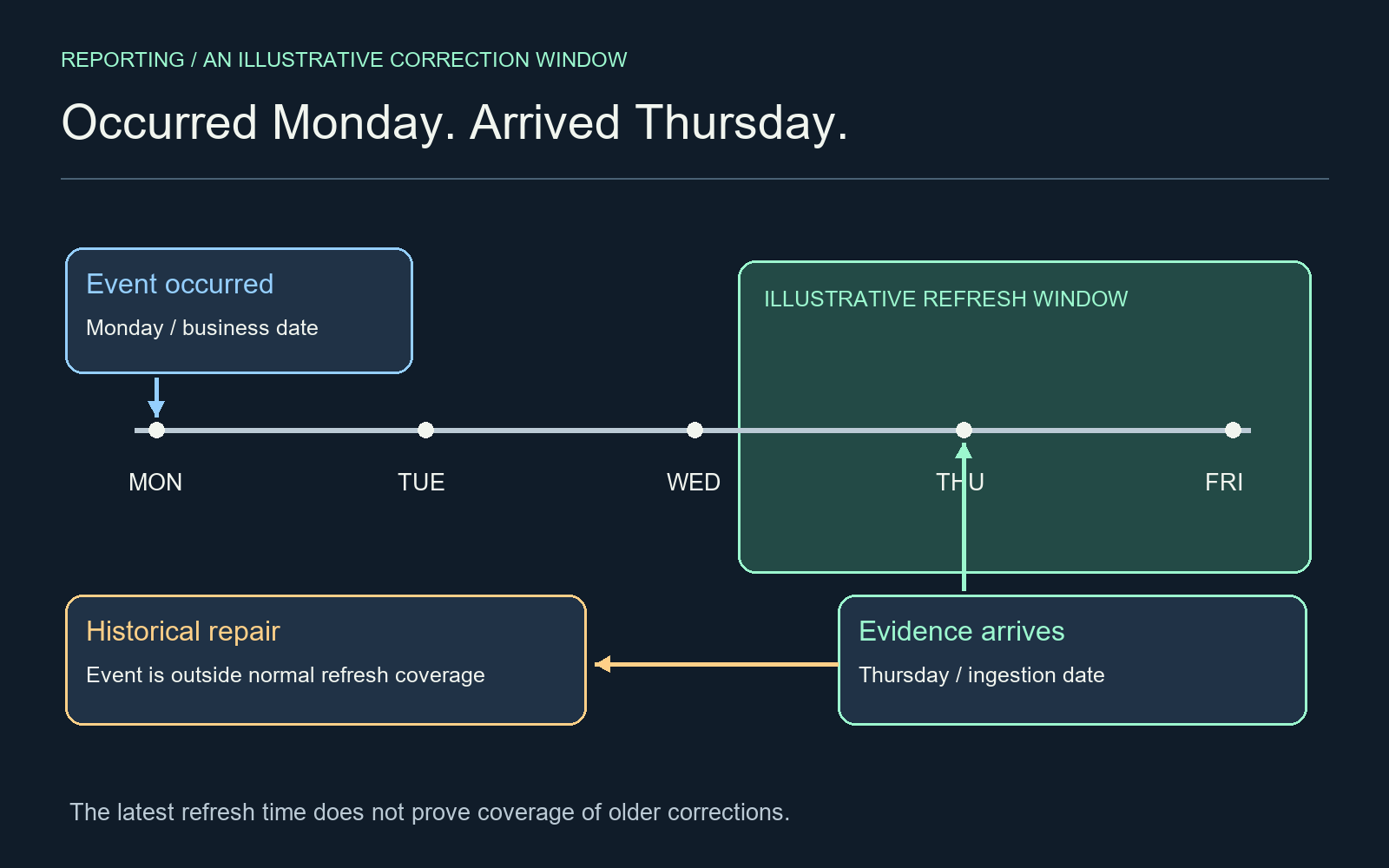
Start with two dates on one record
A reporting analyst supporting delivery operations needs to distinguish when a delivery occurred from when its evidence entered the system. The proposed improvement is to define a correction window and a separate repair path for older records. A recent refresh timestamp cannot substitute for that policy.
In an illustrative delivery business, a route finishes on Monday but an offline device uploads the confirmation on Thursday. A dashboard refreshed Thursday may query only recent occurrence dates. If Monday is outside that range, the new confirmation can be present in the source and absent from the report at the same time.
Understand what incremental refresh covers
Microsoft’s Power BI documentation distinguishes the stored historical period from the incremental refresh period. Its Detect data changes option evaluates a change-tracking column within periods in the incremental range. These mechanisms do not mean every historical correction is automatically reconsidered on each refresh.
The practical implication is to inspect the actual date column used for partition filtering. An event date, arrival timestamp and last-modified timestamp answer different questions. Document which one controls reporting attribution, which controls extraction and which signals a correction. Changing one to solve ingestion can accidentally move the business event into the wrong reporting period.
Choose a window from evidence
Measure arrival delays and correction ages from records you are authorized to analyze. If those measurements are unavailable, begin with an explicitly provisional window and test representative delayed cases. Do not borrow a convenient number of days from an example and present it as sufficient for your business.
A wider window may increase refresh work. A narrower one needs a stronger exception path. Include weekends, delayed approvals and upstream outages in the discussion. The owner should be able to explain which late records normal refresh will catch and which require intervention.
Give historical repair an owner and a receipt
When an older record changes, identify the affected reporting period and the smallest supported repair operation. Depending on the platform and permissions, that might be an approved partition refresh or a planned broader reload. Verify the exact supported operation before running it; do not assume all workspaces expose the same controls.
Record the correction request, source identifiers, affected period, refresh performed and before/after reconciliation. Preserve the distinction between a changing operational view and an intentionally frozen management snapshot. If a published snapshot is revised, make the revision visible to its readers instead of silently replacing a previously issued number.
Check records and aggregates together
Use a small known set containing an on-time event, a late arrival inside the window, an older correction and a removal. Reconcile identifiers and relevant totals after refresh. A changed aggregate without the expected underlying record is not enough evidence. Confirm the boundary dates and timezone used by the refresh configuration as well.
Editorial hypothesis: an occurrence-versus-arrival timeline will help readers spot why a green refresh can omit old-period changes. The variable is the two-date visual explanation. Reader understanding, completeness and refresh cost have not been measured. The example illustrates a reporting design problem; it is not an accounting policy or a measured customer case.